
Choose an email delivery method
Pick how phishing simulations reach your people, Microsoft Direct Delivery or Google Direct Send, and understand what changing or disconnecting it does.
Before you can launch a phishing simulation, your organization needs a delivery method. Both available methods place simulations straight into your people's mailboxes instead of sending them across the internet as regular email, so your mail filters never quarantine them and your results reflect people rather than filters.
Email delivery settings are available with full migration; Hook support migrates your organization. See Full migration.
The methods
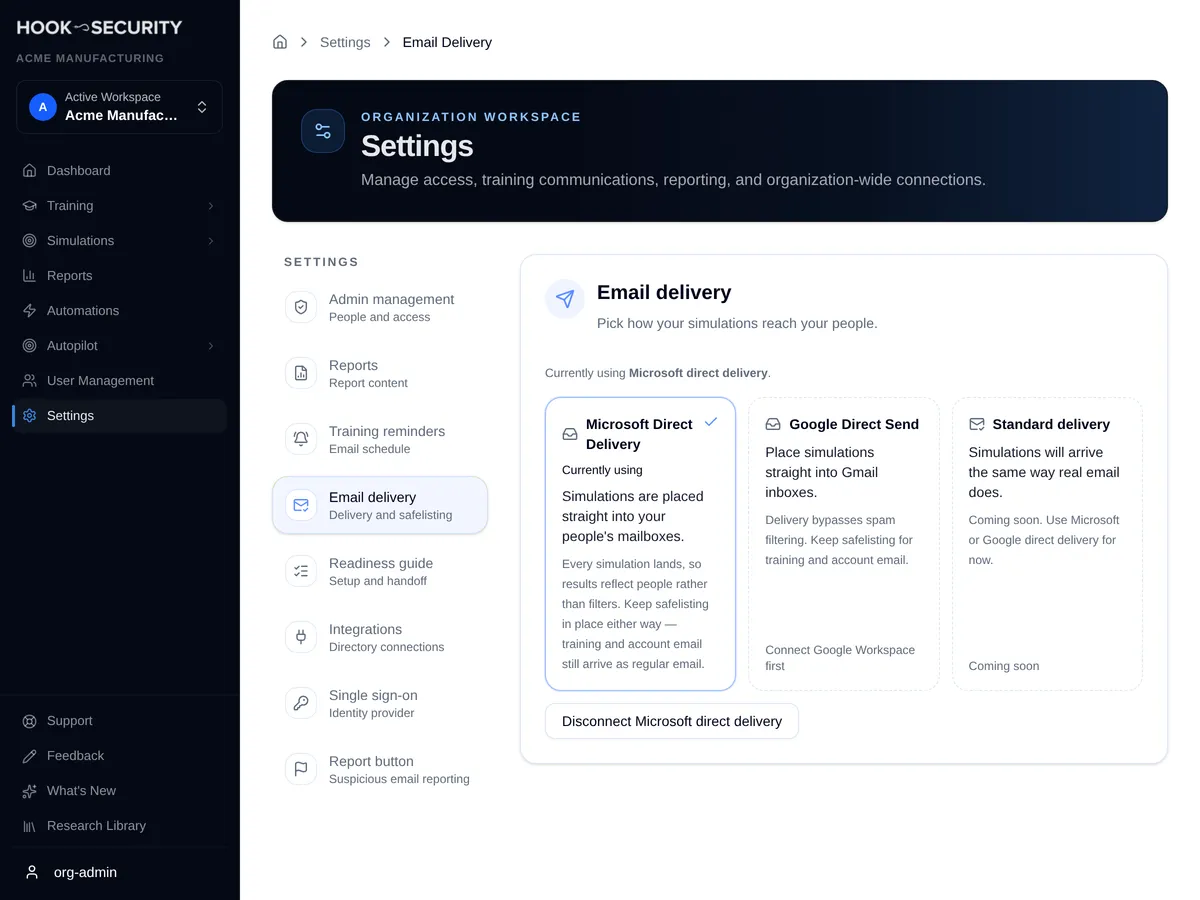
Open Settings, then Email delivery. The page shows one card per method, and the one you're using is marked as current.
- Microsoft Direct Delivery places simulations in Microsoft 365 mailboxes. It needs a connected Microsoft Entra directory. Setup is in Set up Microsoft Direct Delivery.
- Google Direct Send places simulations in Gmail inboxes. It needs a connected Google Workspace directory. Setup is in Set up Google Direct Send.
- Standard delivery, which would send simulations as regular email, is shown but marked coming soon. You can't choose it yet.
A card you can't choose yet says what's missing. The Microsoft card carries a Set up button, and Google's setup steps appear below the cards.
Choose a method
Your organization uses one method at a time, and each new campaign uses the method chosen when you confirm it.
Connect the matching directory
Microsoft Direct Delivery needs Microsoft Entra directory sync; Google Direct Send needs Google Workspace directory sync. A method stays locked until its directory is connected.
Finish that method's setup
Follow the setup page for the method. The last step checks a mailbox in your organization. When that check passes and you haven't chosen a method yet, the method you just set up becomes your choice automatically.
Switch if you need to
If both methods are set up, click the other card to switch. Campaigns that are already scheduled keep the method they were created with. Editing a scheduled campaign moves it to your current method.
Until a method is chosen, the page says no delivery method is selected, and the campaign wizard won't let you start a campaign.
Disconnect a method
Each method has its own disconnect button on this page. If campaigns using that method are scheduled or in progress, Hook tells you how many before you confirm.
Disconnecting cancels that method's scheduled campaigns
Scheduled campaigns that use the method are canceled, and new deliveries through it stop. If it was your chosen method, no method is selected afterward, and you can't launch simulations until you set one up again.
Disconnecting in Hook doesn't remove the permission you granted in Microsoft or Google. Each setup page explains how to revoke it on their side.
Disconnecting the directory a method depends on also clears that method as your choice.
Keep safelisting in place
Direct delivery covers phishing simulations only. Training invitations, reminders, and account emails still arrive as regular email, so keep Hook's sending IPs allowlisted. See Safelist Hook's sending domains and IPs.
Related
Set up Microsoft Direct Delivery
Approve Hook in Microsoft Entra and check a mailbox.
Set up Google Direct Send
Authorize Hook in Google Admin console and check a synced mailbox.
Run a phishing campaign
Launch a simulation once a delivery method is ready.
Troubleshoot phishing delivery
Fix campaigns that won't start and people who weren't sent the email.
Safelist Hook's sending domains and IPs
Give your IT or mail team the Hook sending IPs to allowlist so training, account, and other Hook emails reach real inboxes instead of quarantine.
Set up Microsoft Direct Delivery
Place simulations straight into Microsoft 365 mailboxes by approving Hook in Microsoft Entra and checking one mailbox.