
Troubleshoot phishing campaign delivery and results
Fix campaigns that won't launch, stats that won't load, and simulations that never reach inboxes.
When a simulation doesn't behave the way you expect, it's usually one of a handful of causes: your organization isn't wired up to the delivery provider yet, the template you picked isn't ready, the launch never finished syncing, or the live numbers can't be reached right now. Find your symptom below.
Hook says phishing campaigns aren't available for your organization
You see this at launch. Hook sends simulations through a delivery provider, and your organization doesn't have an account and key on file yet. Hook checks for both before it creates anything, so it stops here rather than leaving you with a half-configured campaign.
You can't fix this yourself. Email support@hooksecurity.co with your organization name and ask to be provisioned for phishing. Once that's done, reopen the wizard and launch again. Nothing changes on your end, and the same campaign details will work.
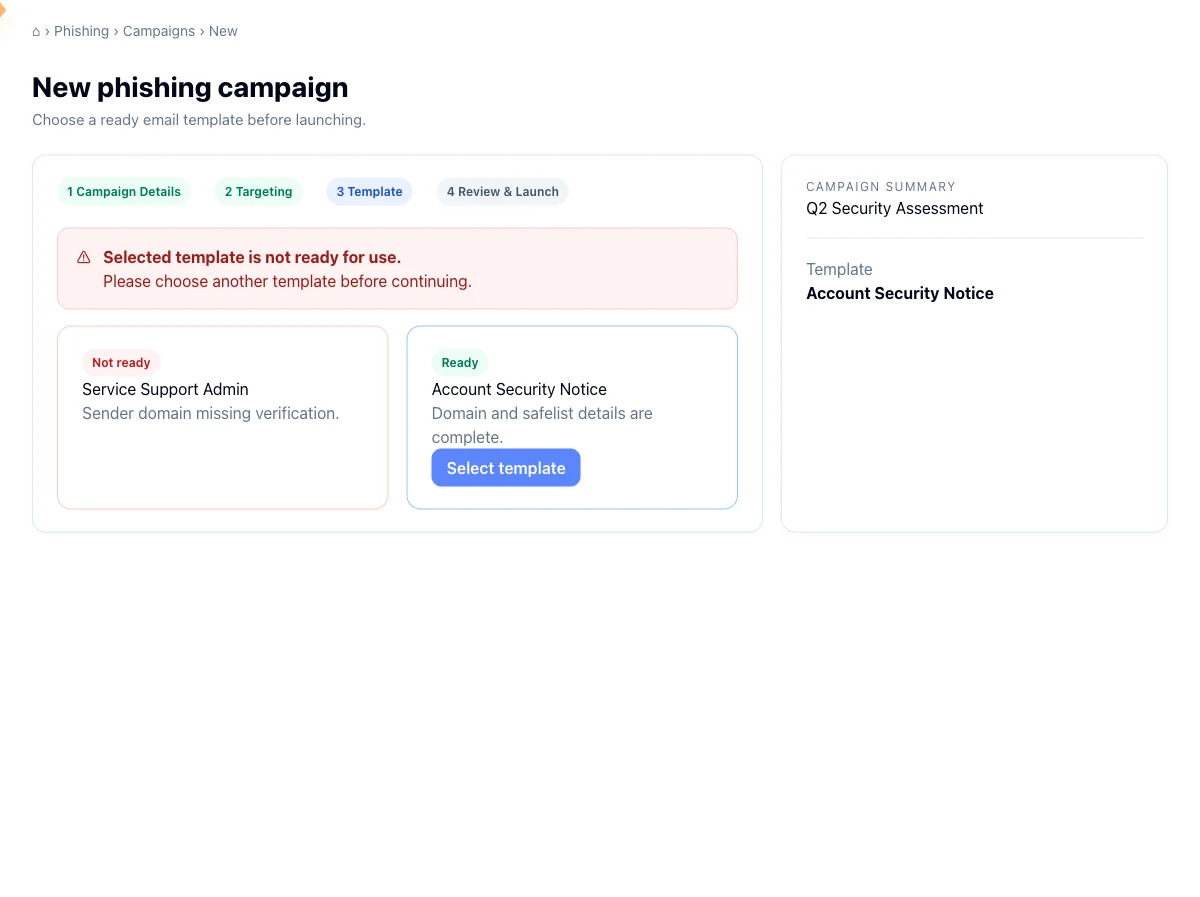
Hook says the template isn't ready to use
Every template in the library has to be linked to a provider template before it can ship, and the one you picked isn't linked yet. That's usually a stock template still being prepared, or a custom one whose sync hasn't finished.
Go back to the Template step and pick another. Most stock templates are ready. You don't have to start over, because the wizard keeps your name, targeting, and other selections while you swap. If one specific template keeps failing, tell support so it can be relinked.
The campaign says Failed
Hook writes the campaign to its own records before it calls the provider, so a failed launch leaves a visible record instead of vanishing. Failed means that local record exists but the provider step never completed. The simulation was never created upstream, so no email went out.
Before you act, make sure it really failed. A campaign created in the last few minutes reads as Setting up, not Failed, while the provider call finishes. Hook allows a five minute grace period before it treats anything as wrong. Refresh after a couple of minutes and see where it lands. Refresh only re-reads the stored record, so once a campaign is genuinely Failed, refreshing it again won't change anything.
To recover, depending on how your account is set up, a failed campaign may offer a Retry button on its detail page. Use it if it's there. If it isn't, build a new campaign from Simulations with the same name, targeting, and template. The failed record stays in your list as a record of the attempt, and you can leave it.
A repeat failure points at the inputs rather than a passing glitch. Check that the groups you targeted are active and linked to the provider, since deleted, inactive, and unlinked groups are all rejected, and that the template is ready. If it still fails, send support the campaign name.
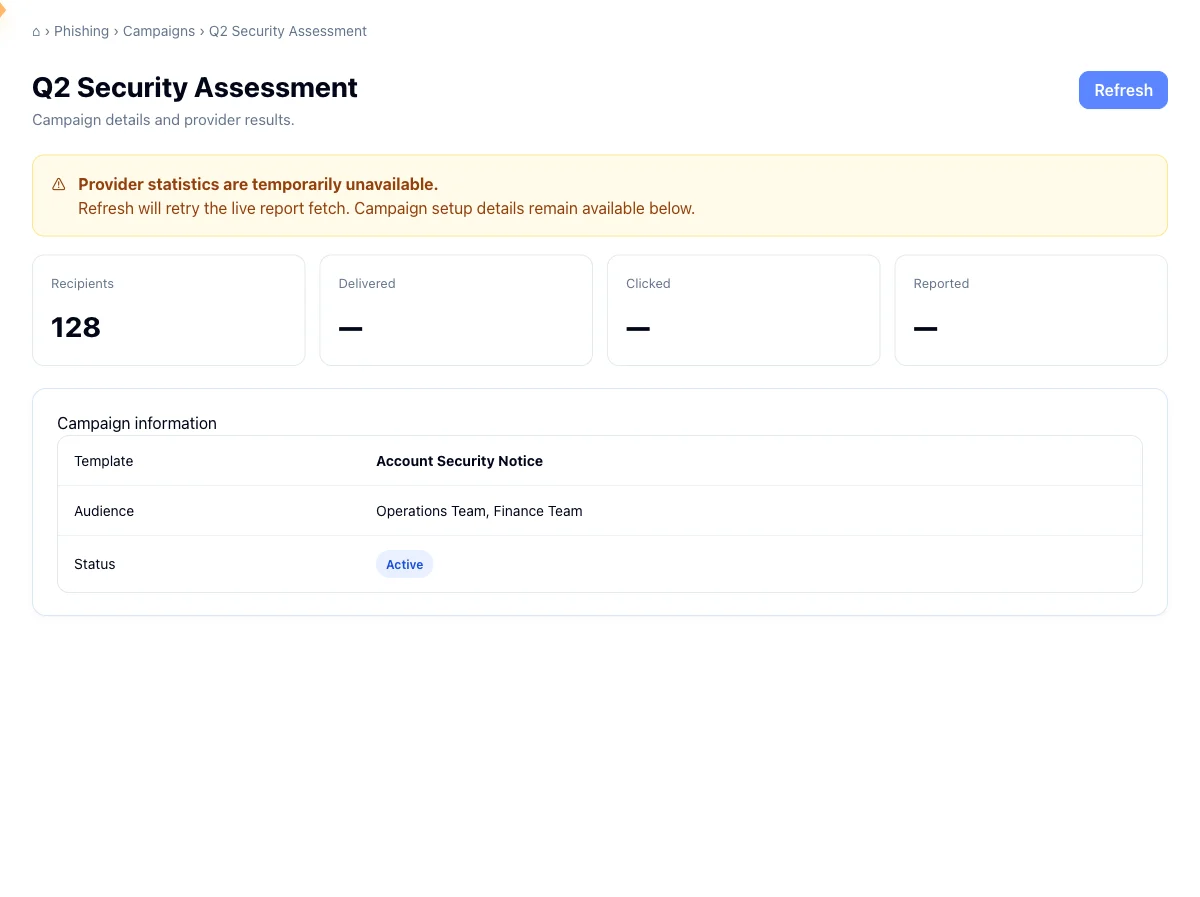
The engagement numbers say they're temporarily unavailable
Live numbers are pulled from the provider each time the campaign page loads. When the provider can't be reached, Hook doesn't blank the page. It keeps the data it already holds locally and flags the live figures as unavailable, with a banner saying so. The campaign itself is fine. Only the fetch failed.
Click Refresh to try the fetch again. If it was a brief blip, the real counts fill in. If it stays unavailable for a long stretch, the provider may be having an outage, so wait and refresh later.
Nothing arrived, or opens look suspiciously low
The campaign is running but recipients say nothing landed, or your opened and clicked counts are far below the audience size. This is rarely a Hook problem and usually mail flow. Either Hook's sending infrastructure isn't safelisted, so your mail provider quarantines the simulation before it reaches anyone, or security scanners are opening links automatically and padding your numbers with activity no person generated.
Safelist Hook's sending domains and IPs
Add them to your mail provider's allow list so simulations skip spam filtering and link rewriting. See Safelist Hook sending domains and IPs for the exact values and the per-provider steps.
Authorize your recipient domains
Confirm the domains you're sending to are authorized for simulation. See Authorize recipient domains.
Run a fresh campaign once the rules propagate
Mail flow changes take time to take effect. Once safelisting is in place, run a new campaign and watch the numbers. They should now track real behavior.
The recipient count doesn't match the wizard estimate
The estimate in the wizard is advisory. The real audience is resolved at send time against live group membership, so if a group changed between the moment you saw the estimate and the moment you launched, the launched count reflects the later reality. There's nothing to fix here: the campaign page count is the authoritative one.
If the gap is large and unexpected, check whether the groups you targeted gained or lost people recently in directory sync.
An estimate stuck at zero with groups selected is worth a second look. Depending on how your account is set up, that can be another sign your org isn't provisioned with the delivery provider yet.
Recipient activity stops at 100 people
On a large campaign, the Recipient activity card can top out at 100 rows. That cap applies when live provider data isn't available, and it exists to keep the page fast rather than to hide a problem. The totals above the card are still accurate. For complete per-person results, use the campaign reports rather than this card.
Related
Run a phishing campaign
Walk the four-step wizard to launch a simulation against your users.
Monitor a live phishing campaign
Read the lifecycle status, engagement funnel, and recipient activity on a campaign.
Safelist Hook sending domains and IPs
Allow Hook's mail through your filters so simulations reach inboxes.
Authorize recipient domains
Confirm the domains you send simulations to are authorized.